CSS 박스 모델
데일리 팀미션으로 준비한 질문을 준비하다 보니 박스 모델에 관해서 다시 한번 공부를 하게 되어서 정리를 했다. 답변에 대한 출처도 함께 찾아서 정리했다.
질문 : CSS 박스모델과 두 유형에 대해 설명 및 블록요소와 인라인 요소가 박스모델을 해석하는 차이를 설명해 주세요
1. css 박스 모델이란
브라우저가 문서를 렌더링을 할 때 HTML 요소를 하나의 박스로 간주해 레이아웃을 구성하는 방식입니다. 하나의 박스는 콘텐츠영역, 패딩영역, 테두리영역, 마진영역으로 구성되어있습니다.
When laying out a document, the browser's rendering engine represents each element as a rectangular box according to the standard CSS basic box model.
https://developer.mozilla.org/en-US/docs/Web/CSS/CSS_box_model/Introduction_to_the_CSS_box_model
2. css 박스 모델에는 크게 두 가지 유형이 있습니다.
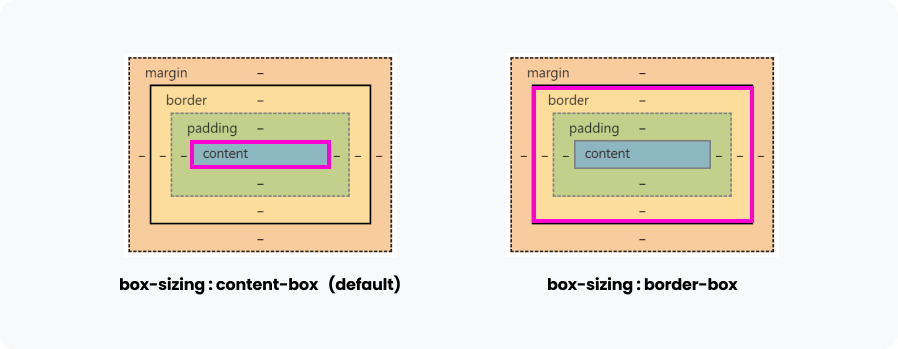
box-sizing : content-box :
box-sizing 속성의 기본값은 content-box이며 콘텐츠영역의 크기를 width, height 등의 속성을 이용해서 설정할 수 있습니다.
If the box-sizing property is set to content-box (default) and if the element is a block element, the content area's size can be explicitly defined with the width, min-width, max-width, height, min-height, and max-height properties.
box-sizing : border-box :
box-sizing 속성이 border-box가 되면 테두리영역의 크기를 width, height등의 속성을 이용해서 설정할 수 있습니다. 이것은 요소의 너비 및 높이가 패딩 영역과 테두리 영역을 포함하게 되는 것과 동일하다고 볼 수 있습니다.
If the box-sizing property is set to border-box, the border area's size can be explicitly defined with the width, min-width, max-width, height, min-height, and max-height properties.
3. 인라인요소와 블록요소의 박스모델 해석의 차이
일반적으로 블록요소와 인라인요소 두 요소 모두 박스모델을 따릅니다. 하지만 인라인 요소는 다음과 같은 차이점이 있습니다. css에 적은 패딩, 마진, 보더, 너비 값이 기록은 되고 있으나 아래의 경우 시각적으로 표현이 되지 않습니다.
1) 인라인 요소는 콘텐츠의 길이 따라 너비와 높이가 결정됩니다. 따라서 너비 높이를 설정하여도 표현이 되지 않습니다.
2) 인라인 요소는 좌우 마진은 가능하나 상하 마진은 적용이 불가능합니다. 따라서 상하 마진을 설정 하여도 표현되지 않습니다.
Margin properties specify the width of the margin area of a box. The 'margin' shorthand property sets the margin for all four sides while the other margin properties only set their respective side. These properties apply to all elements, but vertical margins will not have any effect on non-replaced inline elements.
https://www.w3.org/TR/CSS21/box.html#margin-properties
3) 인라인 요소는 패딩과 보더를 적용가능하나 세로방향 레이아웃에 영향을 주지 못합니다
Finally, note that for non-replaced inline elements, the amount of space taken up (the contribution to the height of the line) is determined by the line-height property, even though the borders and padding are still displayed around the content.
https://developer.mozilla.org/en-US/docs/Web/CSS/CSS_box_model/Introduction_to_the_CSS_box_model